Custom Events Done Right: 8 Things to Track in Your App (with Code)
Pageviews tell you who showed up. Custom events tell you what they did. This is the part of analytics that actually changes decisions — and it's the part most people never set up. Here are eight events worth tracking, the one-liner that fires each, and the naming rule that keeps them readable a year later.
Why events matter more than pageviews
A pageview is a coarse signal: someone landed on a URL. It doesn't tell you whether they clicked the CTA, picked a plan, finished the form, or quietly left. Most of what you actually want to optimise — conversion, activation, drop-off — lives between pageviews, not on them.
Custom events are the way to close that gap. One line of JavaScript fires when something meaningful happens. The event is anonymous (no PII, no cookies), aggregated server-side, and visible in your dashboard alongside traffic.
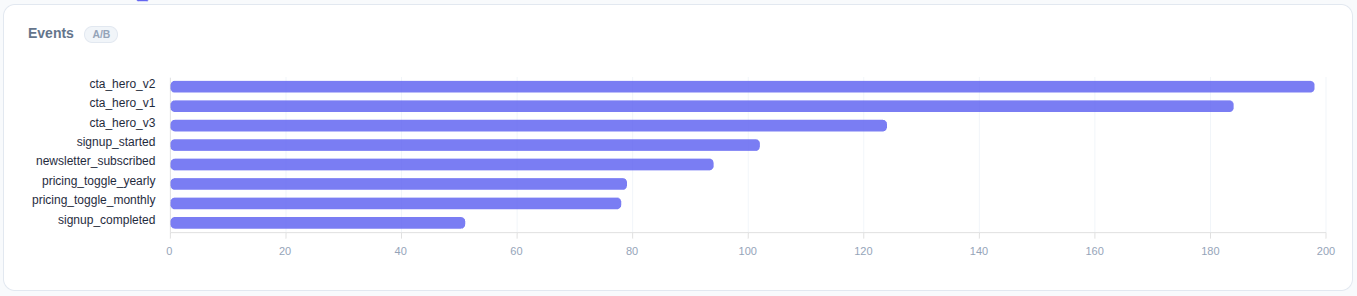
The Logly events API in one line
Once p.js is on your site, the tracker exposes a single function:
window.logly('event', 'signup_completed');That's the whole API. No SDK, no init step, no payload object. You fire the name when the thing happens; the Worker aggregates by name and shows you counts in the dashboard. Names are capped at 100 characters and should be lowercase snake_case — more on that below.
Eight events worth tracking (with code)
1. CTA click on the landing page
Before the user has even signed up, you want to know whether the primary CTA is doing its job. Two events, one per CTA, gives you click-through by section.
document.querySelector('.btn-hero').addEventListener('click', function () {
  window.logly('event', 'cta_hero_click');
});
If you have a second CTA further down (pricing, footer), give it a distinct name (cta_pricing_click). Don't lump them together — the whole point is to compare.
2. Signup started vs signup completed
This is the single most useful pair of events in any SaaS. The ratio between them is your signup funnel's drop-off rate.
// when the form is first focused or opened
window.logly('event', 'signup_started');

// after the API confirms account creation
window.logly('event', 'signup_completed');
A healthy ratio is rarely above 60%. If yours is 15%, the form is the bottleneck, not the traffic.
3. Plan selection (one event per plan)
Don't fire a single plan_selected event with the plan name in a payload — that data won't appear in a privacy-first tool. Use one event per plan instead.
// pricing page
on('click', '.plan-starter', () => window.logly('event', 'plan_selected_starter'));
on('click', '.plan-pro',     () => window.logly('event', 'plan_selected_pro'));
on('click', '.plan-business',() => window.logly('event', 'plan_selected_business'));
You'll see them ranked in the dashboard. The cheapest plan winning by 10× isn't a problem; the most expensive plan getting zero clicks usually is.
4. Newsletter subscribe
The trick here is to fire after the submission succeeds, not on form open. Most "newsletter signups" reported by tools are people who opened the modal and never typed an email.
form.addEventListener('submit', async (e) => {
  e.preventDefault();
  const ok = await subscribe(form.email.value);
  if (ok) window.logly('event', 'newsletter_subscribed');
});
5. Outbound link click
You usually don't get a pageview for a click that leaves the site. Fire an event before the navigation happens.
document.querySelectorAll('a[href^="http"]').forEach((a) => {
  if (a.host !== location.host) {
    a.addEventListener('click', () => {
      window.logly('event', 'outbound_' + a.host.replace(/\W/g, '_'));
    });
  }
});
The event name includes the destination host, so outbound_github_com and outbound_docs_example_com show up separately. Useful for measuring traffic to docs, app subdomains, or partner sites.
6. Lead magnet / PDF download
A PDF download from a CDN won't generate a pageview on your domain. Without an event, this traffic is invisible.
document.querySelector('a[href$=".pdf"]').addEventListener('click', () => {
  window.logly('event', 'download_pricing_pdf');
});
7. Scroll depth on long content
On a 4,000-word article, "did anyone reach the end?" is a more honest engagement signal than time-on-page. One event at 75% scroll, fired once per session, is enough.
let fired = false;
window.addEventListener('scroll', () => {
  if (fired) return;
  const pct = (window.scrollY + innerHeight) / document.body.scrollHeight;
  if (pct >= 0.75) {
    window.logly('event', 'article_read_75');
    fired = true;
  }
}, { passive: true });
8. A/B variant exposure
If you're testing two versions of a hero, fire an event the moment a variant is rendered. Each variant is a separate event name. The dashboard's count of hero_variant_a vs hero_variant_b is your sample-size check; pairing each with its conversion event (e.g. signup_completed) is the test.
const variant = Math.random() < 0.5 ? 'a' : 'b';
renderHero(variant);
window.logly('event', 'hero_variant_' + variant);
Naming convention: the rule that pays off in six months
Event names are the only thing you'll see in the dashboard. Spend ten seconds on the name; you'll spend an hour later if you don't.
- lowercase, snake_case —
signup_completed, notSignupCompletedorsignup-completed. - object_verb or verb_object, pick one — pick a side and stick with it. Mixing
signup_completedwithcompleted_signupmeans you'll always have to remember which one you used. - Prefix by surface —
cta_hero_click,cta_pricing_click,cta_footer_click. The prefix makes them group naturally in an alphabetised list. - Never put PII or IDs in the name — no emails, no user IDs, no order numbers. The dashboard shows event names verbatim.
Three mistakes that waste the data
Firing on hover or modal open. You'll inflate counts with people who never converted. Fire on the success state, not the attempt.
One generic event for everything. A single button_click event with no further breakdown tells you nothing. The whole point of a custom event is to be specific.
Forgetting to remove test events before launch. Five test_event entries will sit at the top of your dashboard for months. Wrap them in a guard or take them out before deploy.
In Logly, every event you fire is visible in the Events panel within seconds. There's no schema to register, no event taxonomy to declare upfront — fire the name, see it in the dashboard, rename it if you don't like it. Same anonymous, cookie-free pipeline as pageviews.
Cookbook: trigger patterns
The window.logly('event', name) call itself is always one line. What varies is the trigger — the JavaScript that decides when to fire it. These five patterns cover ~95% of real cases. Reach for the simplest one that answers your question.
1. Click — the default (1 line)
The most common case. If you already have the click handler, one line is enough.
btn.addEventListener('click', () => window.logly('event', 'cta_hero_click'));2. Form submit success — fire after success, not on submit attempt
The trap here is firing on submit directly, which counts every attempt including the ones that fail validation. Wait for the success state.
form.addEventListener('submit', async (e) => {
  e.preventDefault();
  const ok = await submitForm(form);
  if (ok) window.logly('event', 'signup_completed');
});
3. Element scrolled into view — once per session
This is the right pattern for "did anyone reach the pricing section?" or "did anyone see the testimonial block?". Combined with a click event on the same surface, the ratio click / view is the actual conversion rate of that section — far more actionable than raw clicks.
const section = document.getElementById('pricing');
let fired = false;
const io = new IntersectionObserver((entries) => {
  entries.forEach((e) => {
    if (e.isIntersecting && !fired) {
      fired = true;
      window.logly('event', 'pricing_section_seen');
      io.disconnect();
    }
  });
}, { threshold: 0.5 });
io.observe(section);
When to use it. Sections below the fold where the question is "what % of visitors get this far". For above-the-fold elements like the hero CTA, this event is redundant — everyone who loads the page sees it.
4. Scroll depth milestone — engagement on long content
For articles, docs, or long-form landing pages. Fires once when the user reaches 75% of page height. Combine with article_started for completion rate.
let fired = false;
window.addEventListener('scroll', () => {
  if (fired) return;
  const pct = (window.scrollY + innerHeight) / document.body.scrollHeight;
  if (pct >= 0.75) {
    window.logly('event', 'article_read_75');
    fired = true;
  }
}, { passive: true });
5. Dwell time — viewed AND stayed
A view-in event fires the instant a pixel is visible. Sometimes you want stricter: "viewed for at least 5 seconds". Useful for ad placements, banner experiments, or hero sections where a quick scroll-past doesn't count as exposure.
const banner = document.querySelector('.enterprise-banner');
let timer = null, fired = false;
const io = new IntersectionObserver((entries) => {
  entries.forEach((e) => {
    if (e.isIntersecting && !fired) {
      timer = setTimeout(() => {
        fired = true;
        window.logly('event', 'banner_dwelled_5s');
      }, 5000);
    } else if (timer) {
      clearTimeout(timer); timer = null;
    }
  });
}, { threshold: 0.5 });
io.observe(banner);
One rule above all. Reach for the click pattern first. Only escalate to view-in or dwell when the question you're trying to answer needs a denominator (rates) or a quality filter (real exposure, not scroll-past). Adding view-in events to everything inflates your event log and dilutes the signal.
Where events take you next
Events on their own give you counts. Strung together in a sequence — landing → CTA click → signup started → signup completed — they become a funnel, and you stop guessing where people drop off. That's the next piece of this puzzle.
Track the moments that actually matter
Logly's events are one line of JavaScript, anonymous, and visible in the dashboard within seconds. Free up to 10,000 pageviews/month.
Get started free →